Getting an ocean freight quote has traditionally worked like this: find three forwarders, email all of them, answer the same eight questions three times, wait two or three business days, then receive three PDFs that are impossible to compare because every one of them breaks out charges differently.
Then you pick one, sign a service agreement, get onboarded, and only then do you find out what the platform actually looks like.
That order is backwards. You should be able to look first.
Gateway Lines has opened public sign-up at gatewaylines.com/sign-up. Any importer or exporter can create a free ocean freight account in under two minutes, walk through the platform, price a lane, calculate landed cost, plan a container, and book a shipment. There is no contract to sign first, no sales call to sit through, and no charge to open the account.
What a Free Ocean Freight Account Actually Includes
Most "free account" offers in logistics are a lead form wearing a costume. You enter your details, you get an estimate that is deliberately vague, and a salesperson calls you the next morning.
A Gateway account works differently. Once your business email is confirmed, you can:
Price your lane. Search current FCL spot rates by origin port, destination port, and container size across supported port pairs, including 20-foot, 40-foot, and 40-foot high-cube equipment.
Calculate landed cost before you commit. Run an HTS code through the tariff engine to estimate base duty, Section 301 and Section 232 exposure, and applicable trade-remedy tariffs, then compare the same product sourced from different countries.
Plan the container. Load cargo dimensions and weights into the 3D load planner to see how the freight actually fits, where the weight sits, and whether you need one container or two.
Get a full quote, not just a freight rate. Submit your cargo and get pricing that covers ocean freight, customs brokerage, marine cargo insurance, and inland delivery, so the landed cost is on the screen before you commit to anything.
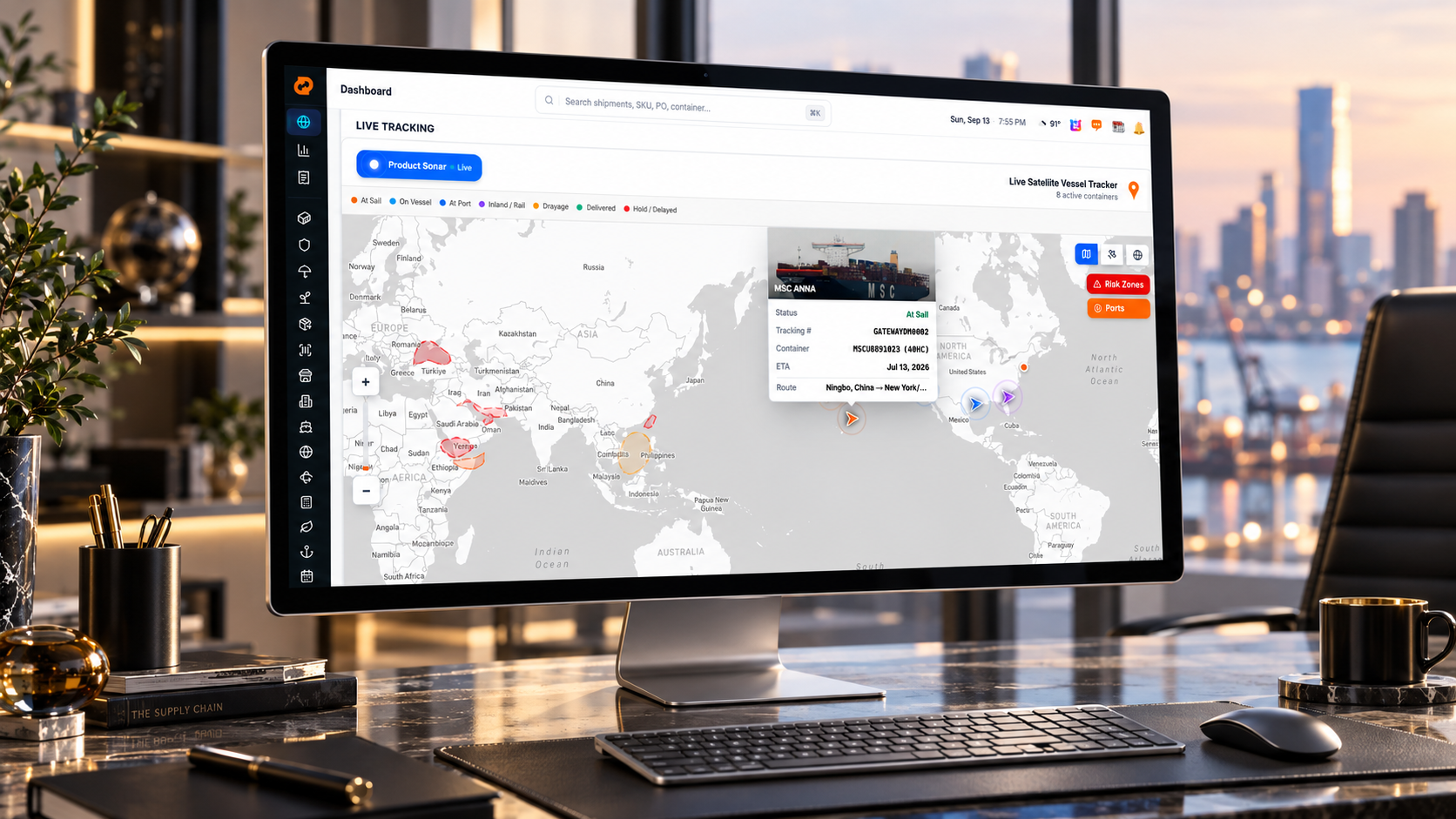
Explore the platform. Walk through the dashboard, the tracking map, and the tools before you commit anything, so you know what you are getting.
Book a shipment. A free account is not a viewing gallery. You can submit real cargo and book it.
You are not paying for any of that, and you are not obligated to use any of it.
Booking Is What Activates the Account
Everything up to and including the booking is open to a free account. You can price, plan, quote, and book, and the quote covers the whole move: freight, customs, insurance, and delivery.
What opens on activation is the operational layer, which only exists once there is a real container moving. Book your first shipment and Gateway's operations team picks up the file, and the rest of the platform opens at app.gatewaylines.com:
Live customs entry status on filings made through licensed customs brokerage partners, visible against the shipment instead of buried in an email thread.
Insurance certificates issued and stored in the shipment file once cover is bound.
Carbon insetting and emissions reporting at the shipment level, on eligible lanes at no additional cost.
Satellite container tracking with live vessel position, predicted ETA, and stage-by-stage status from sail through drayage and delivery.
Last Free Day alerts so demurrage and detention exposure surfaces before it becomes an invoice rather than after.
Port congestion monitoring and risk-zone visibility on the lanes your containers are actually moving on.
Watch lists for the shipments, SKUs, and purchase orders you want flagged.
Document management covering bills of lading, arrival notices, commercial invoices, packing lists, and customs paperwork, all filed against the shipment.
Shipment-specific and contracted pricing on your lanes, rather than the public spot reference.
Compliance lookup tools for verifying carriers, brokers, and counterparties before you trade with them.
Anchor Miles Club, an opt-in loyalty program where full-container shipments earn miles across six tiers.
The split is simple. The free account is for deciding and for booking. The full portal is for operating. You get the second one by shipping, not by upgrading a subscription, because there is no subscription.
What Is Actually Behind the Login
Most freight portals are a tracking page with a document folder bolted on. Gateway Terminal runs about two dozen modules. Grouped roughly:
Freight and operations. Shipments, contracted and GRX rates, standard shipping, track and trace, vessel schedules, inbound orders with EDI or manual entry, documents, invoices, and E-Filing.
Supply chain. Inventory management, supplier management with supplier logins, and vendor management with vendor logins, so your factory and your vendors work inside the same file you do instead of emailing you spreadsheets.
Intelligence. Product Sonar searches your catalog at the SKU level across the product lifecycle, showing unit price, duty rate, landed cost per unit, and total in-transit value for any product you import. Trade data and the intelligence dashboard sit alongside it.
Compliance tools. OTI lookup for FMC-licensed NVOCCs and ocean freight forwarders, carrier lookup against FMCSA and DOT records, CBP licensed broker lookup, SCAC code lookup, corporation lookup against state business registries, and denied party screening against OFAC, SDN, BIS, and eleven government lists. Verify who you are trading with before the cargo moves, not after.
Planning tools. 3D load planner, tariff simulator, duty calculator, emissions calculator, and port data including live wind, weather, and wave conditions.
Booking by description. Natural language booking lets you request a shipment by describing it rather than filling out a form.
That is the part competitors cannot match on a landing page, and it is the reason sign-up is open. You can go see it.
Why There Is No Price Tag on This
It is a fair question. Enterprise logistics platforms charge real money for load planning software, tariff databases, and rate visibility. Gateway gives that away.
The reason is structural. Gateway Lines is an FMC-licensed NVOCC and ocean freight forwarder. It earns revenue by moving containers, with a flat platform fee per shipment, not by selling seat licenses or annual software contracts. The tools exist to help you decide whether a shipment makes sense, and a shipper who understands their landed cost before they buy is a better customer than one who finds out at the port.
There is no upsell path because there is nothing to upsell. The tools are the same tools Gateway's operations run on.
Who Can Open an Account
Gateway works with cargo owners only. That means importers, exporters, manufacturers, distributors, wholesalers, and ecommerce brands shipping their own goods.
Gateway does not onboard other freight forwarders, NVOCCs, customs brokers, 3PLs, overseas agents, or resellers. Gateway is itself a licensed NVOCC and forwarder, so taking on competitors as customers would expose the rate structures, lane data, and shipment information of actual cargo owners. Accounts that appear to be resellers are declined.
If you own the freight, the account is for you.
How to Sign Up
Go to gatewaylines.com/sign-up and enter your business email and company details.
Confirm your email and set a password. Business email addresses only, since the account is tied to a company rather than an individual.
Sign in and start pricing. Check your lane, run your HTS code, plan your container, and book when you are ready.
There is no waiting period and no approval queue for standard accounts.
Your First Container Is the Hard One
Companies importing for the first time tend to assume the process requires a customs broker on retainer, an existing forwarder relationship, and a volume commitment before anyone will talk to them. None of that is true.
A first-time importer moving one container from Ningbo faces the same core questions as a distributor moving two hundred a year: what does the lane cost, what is the duty, will it fit, when does it sail, and what happens if it is late. The difference is that the larger shipper already has tools to answer those questions.
Opening an account is how you get the same ones.
Create your free account at gatewaylines.com/sign-up and price your first lane today.
Frequently Asked Questions
Is a Gateway Lines account free?
Yes. Creating an account at gatewaylines.com/sign-up costs nothing, requires no contract, and carries no minimum volume commitment. Gateway earns revenue on the freight it moves, not on account access.
Do I need an account to get an ocean freight rate?
No. Public FCL spot rates are available at oceanrates.gatewaylines.com, the tariff calculator runs free at tariff.gatewaylines.com, and container tracking is open to anyone. An account removes the usage limits on those tools and lets you book a shipment.
Can I book a container with a free account?
Yes. A free account is a working account. You can price your lane, plan the container, and book a shipment without any prior contract or onboarding process. Booking is what moves the account into activation.
What is the difference between the sign-up account and app.gatewaylines.com?
The sign-up account gives you rate search, duty calculation, load planning, full quoting, and booking. Your quote includes customs brokerage and cargo insurance pricing from the start. Once you book and the account activates, the full portal at app.gatewaylines.com opens up: satellite container tracking, Last Free Day alerts, port congestion monitoring, live customs entry status, insurance certificates on file, carbon insetting and emissions reporting, document management, contracted lane pricing, and the Anchor Miles Club loyalty program.
Can I get customs clearance and cargo insurance priced before I book?
Yes. Customs brokerage and marine cargo insurance are quoted up front alongside ocean freight and inland delivery, so the full landed cost is visible before you commit rather than reconciled after arrival. What opens once the account activates is the operational layer around those services: live entry status, certificates filed against the shipment, and emissions reporting.
Does Gateway Lines accept freight forwarders or NVOCCs as customers?
No. Gateway works exclusively with cargo owners who ship their own goods. Freight forwarders, NVOCCs, customs brokers, 3PLs, overseas agents, and resellers are not onboarded.
How long does sign-up take?
Under two minutes. You enter your business email and company details, confirm the email, set a password, and you are in. There is no approval queue for standard accounts.
What does Gateway Lines charge?
Ocean freight is quoted at the published rate with one flat Gateway fee per container. Duties, customs entry fees, insurance, and inland delivery are quoted separately and shown before you book, so the landed cost is visible up front rather than reconciled after arrival.